Getting students to book meetings more tightly
A small hack for booking meetings.
Teams has a ‘Book a meeting with me’ feature, which I tried for a year, but it is really intended for sales teams (and presumably works very well for them). I regularly have large groups of students where some subset will want to book meetings with me, but I want to avoid them booking meetings like this:
| Date | Day | Platform | Time | Booking |
|---|---|---|---|---|
| 05/03/2026 | Thu | Teams | 11:00 | Bingo |
| 05/03/2026 | Thu | Teams | 11:20 | |
| 05/03/2026 | Thu | Teams | 11:40 | |
| 05/03/2026 | Thu | Teams | 12:00 | Bluey |
| 05/03/2026 | Thu | Teams | 12:20 | |
| 05/03/2026 | Thu | Teams | 12:40 | Bandit |
| 06/03/2026 | Fri | Teams | 10:20 | |
| 06/03/2026 | Fri | Teams | 10:40 | Chilli |
| 06/03/2026 | Fri | Teams | 11:00 | |
| 06/03/2026 | Fri | Teams | 11:20 | Muffin |
(I’ve changed the names, but that was literally my bookings.)
However, this:
| Date | Day | Platform | Time | Booking |
|---|---|---|---|---|
| 05/03/2026 | Thu | Teams | 11:00 | Bingo |
| 05/03/2026 | Thu | Teams | 11:20 | Bluey |
| 05/03/2026 | Thu | Teams | 11:40 | Bandit |
| 05/03/2026 | Thu | Teams | 12:00 | Chilli |
| 05/03/2026 | Thu | Teams | 12:20 | Muffin |
| 05/03/2026 | Thu | Teams | 12:40 | |
| 06/03/2026 | Fri | Teams | 10:20 | |
| 06/03/2026 | Fri | Teams | 10:40 | |
| 06/03/2026 | Fri | Teams | 11:00 | |
| 06/03/2026 | Fri | Teams | 11:20 |
…is much better - these are clearly good students who will go far. I can process them in one go and arrange other things around them.
With that in mind, I wrote this spreadsheet. I put in the times that I have available, set, say, three starting slots as ‘available’, and share it with the students. The first student who opens it has a choice of three slots, and when they choose one, the slot next to it becomes bookable. The next student who opens it will also see a choice of three options, and when they choose one, the slot after that becomes bookable as well. Indeed, they may even book their friend in too.
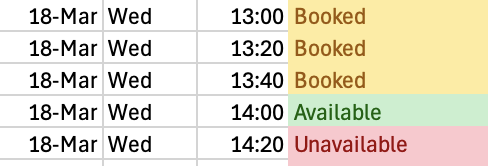
Thus, I get a lovely tightly packed schedule of meetings. I do have to trust the students NOT to mess it up, but such things are logged. Actually, they are less logged than I thought: while Google Sheets is pretty good for recording every single edit, Excel Online is much more ‘a version every so often’. Even so, it is easily fixed.
One exploit a student could use is to put their name on an ‘Unavailable’ slot on the assumption that other students would fill up the time around them, and then their own slot would retroactively become bookable. I think that is kind of fun, and I am fine with a student taking a risk like that as long as they are also fine with missing a meeting if the other students do NOT play ball.
Extra things to know:
- I have a version of the spreadsheet that creates a ‘click here to create a meeting’ link next to the name and then creates the meeting in Teams with the correct times and dates and so on. It is currently a bit hit and miss whether students actually click it, but it is quite useful when they do. Even when they do NOT, the pre-filled meeting details make it worth it for me to click the ones they missed.
- The students try and avoid particularly like being all in one group, and will avoid it if they can, so if you have, say, four afternoons available for booking, the first four meetings will usually be on four separate days. My current meeting setup for next week looks like this:
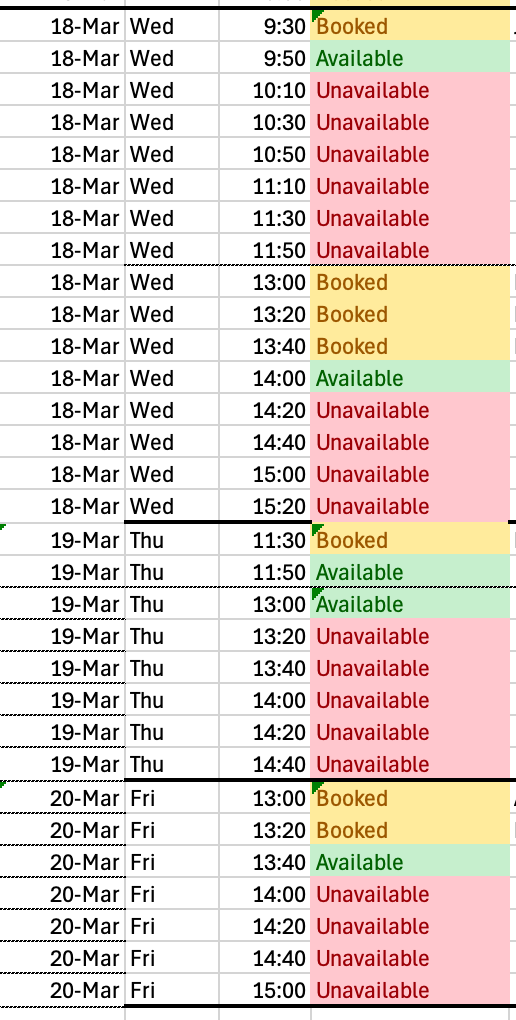
(it will fill up gradually, but I probably should have limited them to three stacks rather than six)